Write and test policies
Write policies in the Visual Builder, Rego, or JavaScript, and test them before saving.
A policy can be built in the Visual Builder or written in Rego or JavaScript. For a given scope, all three receive the same input and produce the same kind of violations; only Rego and JavaScript can set a violation's action, for example fail-build. For a step-by-step first policy, see First policy.
The panel on the right holds Policy Name, Enabled, Scope, Priority, and Description.
Each rule has a Rule Name, Violation Message, and Violation Severity (0.0 to 10.0), and one or more statements added with Add Statement. A statement compares a property (for example vulnerability.severity) with a value. A rule matches when all its statements are true; Add Rule adds another rule to the same policy.
Preview shows the violations the policy would produce without saving it. Save a copy saves it under a new policy.
Convert to Rego policy turns the policy into Rego and can't be undone. To keep the Visual Builder version, select Save a copy first.
Rego is the policy language of Open Policy Agent. Use it for logic the Visual Builder can't express, or to set a violation's action. A Rego policy is plain text, so a copy can be kept in version control.
Policies receive input data with component properties (id, name, version, type, packageUrl in PURL format, a licenses array, an internal flag) and vulnerability properties (severity as a 0-10 CVSS score, vendorId as the advisory identifier such as a CVE, epss, and the vex analysis). The example below skips the four VEX states that mean no action is needed: not_affected, false_positive, resolved, and resolved_with_pedigree. The other two states, exploitable and in_triage, still produce a violation.
This policy flags libraries with high-severity, high-EPSS vulnerabilities that have no VEX resolution:
package observer

import future.keywords.in

violation[v] {
	input.component.type == "library"

	some vulnerability in input.vulnerabilities
	vulnerability.severity > 7
	vulnerability.epss > 0.5

	# Exclude VEX-resolved vulnerabilities
	not vulnerability.vex.state == "not_affected"
	not vulnerability.vex.state == "false_positive"
	not vulnerability.vex.state == "resolved"
	not vulnerability.vex.state == "resolved_with_pedigree"

	v := {
		"severity": vulnerability.severity,
		"message": sprintf(
			"%s with severity>7 (%v) and EPSS>0.5 (%0.2f) is not tolerated",
			[
				vulnerability.vendorId,
				vulnerability.severity,
				vulnerability.epss,
			],
		),
	}
}
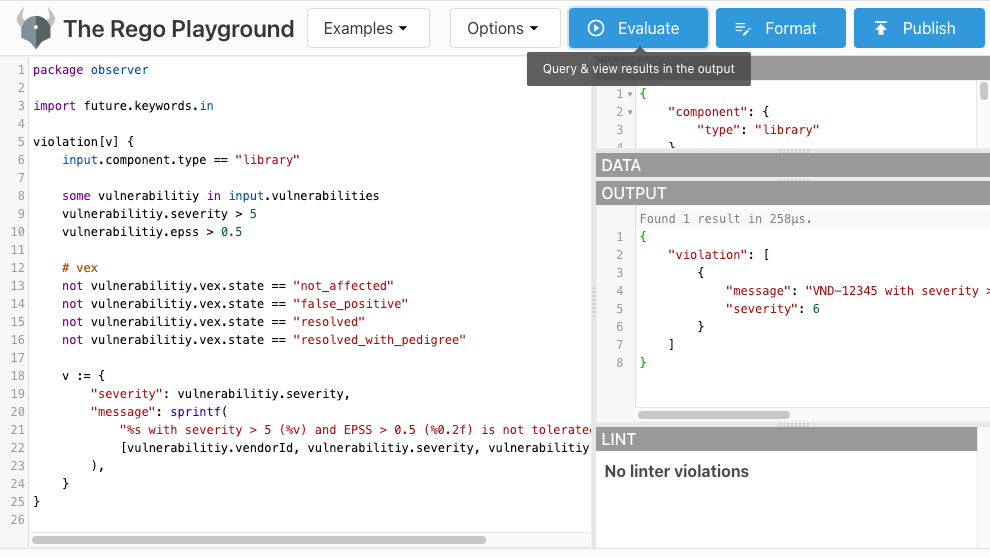
Test it in the Rego Playground: paste the policy, paste the sample input below, and select Evaluate.
A JavaScript policy receives the same input as a Rego policy. Define a Policy function that takes { component, vulnerabilities, namespace } and returns an array of violations, or null when there are none.
This policy flags components with vulnerabilities above a severity threshold:
function Policy({ component, vulnerabilities }) {
  const SEVERITY_THRESHOLD = 7;

  if (vulnerabilities && vulnerabilities.length > 0) {
    return vulnerabilities
      .filter((vulnerability) => vulnerability.severity > SEVERITY_THRESHOLD)
      .map((vulnerability) => ({
        severity: vulnerability.severity,
        message: `${component.name} has a high-severity vulnerability (ID: ${vulnerability.vendorId}, Severity: ${vulnerability.severity}). `,
      }));
  }

  return null;
}
Sample input
{
  "component": {
    "id": "34c0f4772324dec6d00af7127a6f7454f655bc0d",
    "packageUrl": "pkg:npm/zod@3.21.4",
    "type": "library",
    "version": "3.21.4",
    "name": "zod",
    "licenses": [{ "license": { "name": "MIT" } }],
    "createdAt": "2023-10-30T18:28:35.757164+01:00",
    "updatedAt": "2023-10-30T18:28:35.761883+01:00"
  },
  "vulnerabilities": [
    {
      "id": "8820c737e3913979bead47ce9e309ea153e1f7d1",
      "severity": 7.5,
      "vendorId": "CVE-2023-4316",
      "epss": 0.00046,
      "vex": {
        "state": "not_affected",
        "justification": "requires_configuration"
      }
    },
    {
      "id": "a1b2c3d4e5f69780b1c2d3e4f5a67890b1c2d3e4",
      "severity": 8.8,
      "vendorId": "CVE-2023-9999",
      "epss": 0.6
    }
  ],
  "namespace": {
    "tenantId": "org-4dec6d00af7127a6",
    "space": "default"
  }
}
With this input, the example Rego policy flags CVE-2023-9999 (severity 8.8, EPSS 0.6, no VEX) but not CVE-2023-4316 (VEX state not_affected).
Test a policy
In the Visual Builder, select Preview before saving and check the violations list. For Rego, use the Rego Playground with the sample input above. For JavaScript, call the Policy function locally with Node.js and the same input.
Next steps
- Enforce policies in CI/CD to fail a build on a
fail-buildviolation. - Policies for when policies run and what each scope receives.
- First policy for a Visual Builder walkthrough.
- Component-scoped input for every field a component policy receives.