Evaluate open source components
Check the open source project behind a component on the OSS Insights tab, with repository activity, the OpenSSF Scorecard, and SLSA provenance.
An open source package comes with no supplier to ask and no contract behind it. What you can check is the project: whether anyone still maintains it, whether it follows common security practices, and whether the version you run was built from its public source. The OSS Insights tab on a component's page collects this from deps.dev, Google's open source insights service.
Use it when a decision depends on the project rather than on one vulnerability: a vulnerable dependency has no fix yet and you must choose between waiting and replacing it, a policy flags a component, or you review the dependencies a critical application relies on.
Open OSS Insights
Find the component
Open Components and search for the package, or open an application and find it among its dependencies. Select it to open its page.
Select OSS Insights
The tab is available for libraries with an npm, PyPI, Maven, NuGet, Go, or Cargo package URL that deps.dev knows. SBOM Observer fetches the data from deps.dev when you open the component. Containers and machine learning models have a Container Insights or Model Insights tab instead.
Read the project's activity
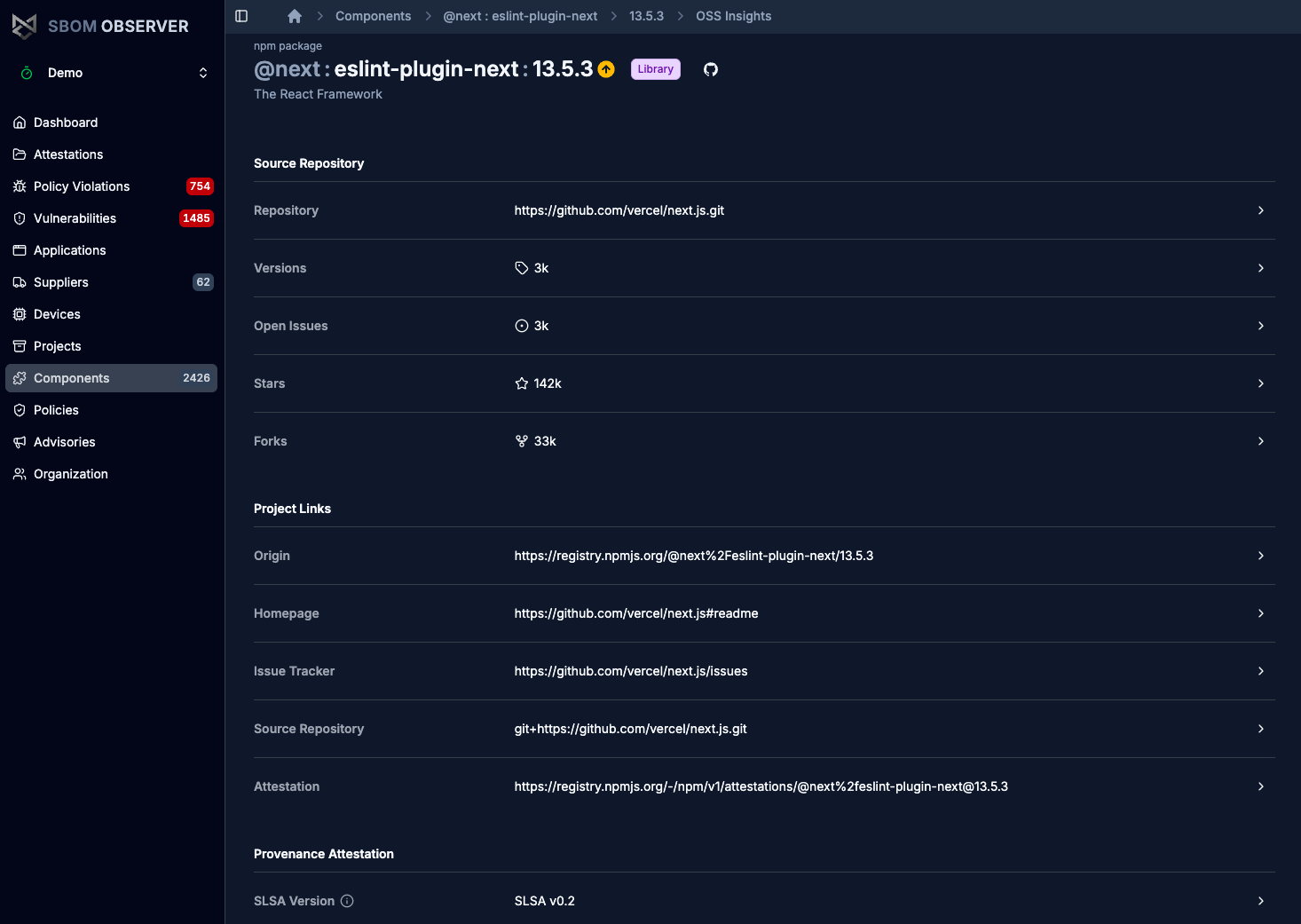
Source Repository shows where the code lives and how active the project is: how many versions have been published, how many issues are open, and the repository's stars and forks. The rows link to the repository, or to the issue tracker for open issues.
Project Links lists the package's page on its registry (Origin), the homepage, the issue tracker, the source repository, and the provenance Attestation if the registry has one.
These numbers describe popularity and activity, not quality. A popular project can stop being maintained, and a small one can be well run. Read them together with the Scorecard's Maintained check below.
Check the OpenSSF Scorecard
The OpenSSF Scorecard checks a repository for security practices such as code review, branch protection, pinned dependencies, and signed releases. Each check scores 0 to 10, and the Scorecard combines them into one score, shown at the top with the commit it was computed for and the date.
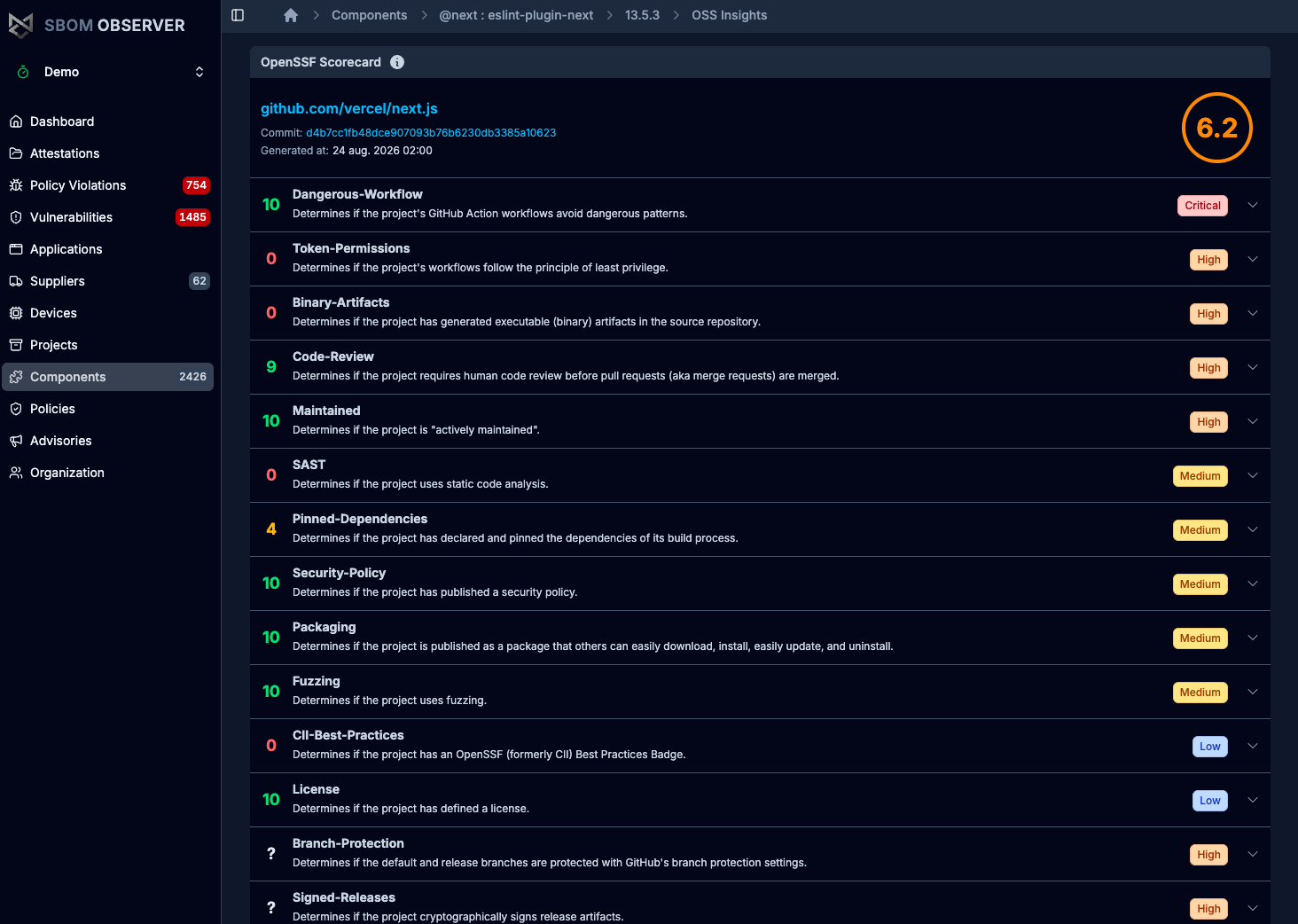
SBOM Observer sorts the checks by risk level, from Critical to Low, and puts the lowest scores first within each level, so a low score on a high-risk check is near the top. A check that could not be evaluated shows ? and is listed last. Select a check to see the reason for its score and a link to the check's documentation.
For a decision about whether to keep relying on a project, start with:
- Maintained: whether the project is at least 90 days old and still has recent activity.
- Code-Review: whether changes are reviewed before they are merged.
- Dangerous-Workflow and Token-Permissions: whether its GitHub Actions workflows avoid dangerous patterns and run with read-only tokens.
- Vulnerabilities: whether the project has unfixed vulnerabilities.
Check provenance
For an npm package published with provenance, the Provenance Attestation section shows where this exact version was built: the SLSA Version, the source Repository with the commit, the Build Config and Workflow run that produced it, and the Log Date and Log Index of its entry in the Sigstore transparency log.
Compare the repository with the one under Source Repository. They should be the same project. Follow Workflow run to see the build itself, and Log Index to open the transparency log entry. SBOM Observer imports the provenance automatically when you upload an SBOM; see Attestations.
Troubleshooting
SBOM Observer has no deps.dev data for the component. Either its package URL is not npm, PyPI, Maven, NuGet, Go, or Cargo, deps.dev doesn't know the package (for example a private one), or the component isn't a library. A self-hosted installation without internet access never has the data, see Deployment models.
deps.dev has no Scorecard result for the project's repository. The rest of the tab still applies.
The package isn't from npm, or this version was published without provenance. Earlier or later versions of the same package may have it.
Related
- Concept: Attestations
- How-to: Analyze vulnerability impact
- Reference: Components